Showing posts with label Android. Show all posts

Tuesday, August 19, 2014

Kajal Majhi

How to know your location history using Google Map

By     No comments:

Google location history, Google location map, google map

Do you remember Google latitude from the past? Where we could share our location data with our friends , we could ping our friends at place on map to gather all together there. Google location and Location history was evolved with Google latitude and now its is much devolved with new features .

Yes Google knows it all, If you ever have used Android or any Other Google apps then Google knows you location . Not only android and apps. But if you use any Google products such as Gmail, Adsense etc then Google has been constantly tracking your approximate location. You can find your location history from Google server by using your phone's browser here https://maps.google.com/locationhistory/b/0   . You can see a map with red dotted points and lines with few timelines at the bottom. The dotted points are the places where your device has been tracked .


Deleting the location history 
If you want to delete some or specific location history data, you can do it from dashboard , click on the date and select “Delete history from this time period”


Enable/disable Google location history
If you are highly concerned about the privacy of your personal life and tech life then you can turn off this features , simple by change its settings from dashboard. Android devices comes with integrated location access setting under the personal panel settings.

Android location access settings, google location acees settings, android snapshot
Screenshot of Google location settings


Read More

Sunday, July 20, 2014

Kajal Majhi

How to securely delete all files

By     1 comment:

Are you planning to sell your smartphone, tablet, laptop? Then you should be aware about few important things about privacy and protection of your data. Every mobile devices has an internal memory and it may have lots of your personal photos, documents , videos and other important files.
What normally people do is “Factory reset” or “Format” by plugging into the computer .

But beware, if you are going to hand over your device the it may not the correct way to securely wipe your every data.  Anyone who have a few knowledge about software can easily recover your deleted data by using freely available data recovery tools like windows kernel and recuva until you overwrites the data randomly. So, don’t fall in the prey of blackmailing your privacy is in your hand .

But there are always an way to get out of the problems which I am going to tell you.

How to delete all files securely in Android ?


If you are not having PC then don’t worry a single apps will do all the required work. It is FILE SHERDDER which is available in playstore.  It claims to delete all your files securely in your android device, I am not sure which algorithm does it use to overwrite the data but I have tested in my Micromax Bolt A56 and it works pretty well and I liked this apps very much.
I tried to recover the deleted files using Forensic imaginer and what all I got is overwritten data , which is not an easy task for a normal person  to extract data and meta data from a over written file. Isn’t it?

How to delete all the files securely in windows?

In our daily life we do many random things like we give our pendrive/usb drive to our friends , we try to sell our laptop and so on. Have you deleted your files securely? It’s the same case like I told you above , any files is not securely deleted until it has been overwritten by random files.  So before you going to hand over your device please wipe your important data properly and this applies to all flash drive, external hdd,  SD card, cellphones , laptop and so on.
Here I  have mentioned few tools which will do all the work for you.

CC-CLEANER


Its an tool with a complete package and most commonly used utility software. It have the features to wipe internet history, cookies, seasons. It can delete the system memory dumps to free up spaces, it can also edit and delete the registry. Apart from this in the tool section there are more important tools like drive wiper with many overwriting phases such as 1 passes , 3 passes , 7 passes, 35 passes .
You can choose the 7 passes that is complex overwriting to wipe your data securely. I am in love with this software.
Download CC-CLEANER


EARESR


It’s a tool which has been developed only to securely delete your files and it does its’ work very well. I personally recommend you this tool if your only intention is to wipe your files . Its an user friendly, overwrite and delete the data using 7 passes and 3 passes method. Even you can add the files and folder and schedule it to delete the data on that  specific time.

Download Eraser  


Read More

Tuesday, August 13, 2013

Kajal Majhi

Recover IMEI number of lost android devices

By     No comments:
Have you lost your Android device and you want its' IMEI number? don't worry if you have your IMEI number then, you have many options to get back your android device. So here is a simple solution to recover your IMEI number.

1 Sign in to your Google account here http://accounts.google.com (remember the gmail id , which you have used in your android device)


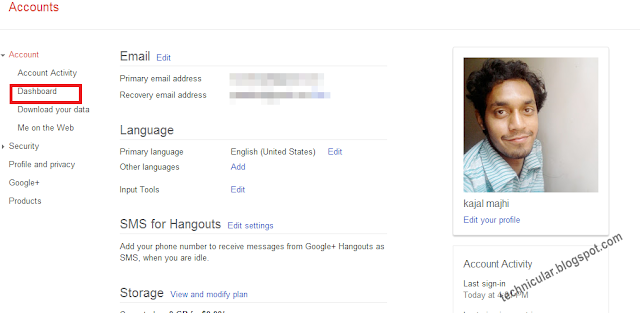
2. Head you mouse cursor towards "DASHBOARD" and click there. Your dashboard will show you all the Google products that you are using.

recover android phone, andsoid imei number


3 Scroll down a little and you would see a section for ANDROID , click on it.


google products


4 There it is.


Recover IMEI number of lost android phone


Read More

Friday, June 21, 2013

Kajal Majhi

Increase battery backup in Android

By     No comments:

Increase battery backup in Android by 4 times.
While we enjoy the smooth experience of Google’s Android OS but it irritates when we get poor battery backup and those who are addicted smartphone user need to carry charger along with them and usually the newbie to smartphones get shocked by its poor backup , and my question is WHY NOT? 


A smartphone has to run it’s processor, runs multiple apps, connect to WiFi, GPS, 3G, light up the big bright screen,  Bluetooth,  music, vibrate, and so on with just a damn battery of 1000 to 2500 mAh.  Its just like backing up a whole building with a car battery, isn’t it?

There are  many apps in the store about increasing battery  backup but they are not going to help much , instead they itself need power to run. Here are some few simple tips by which you can save lots of battery power.


1 Limit the background process

A smartphone can run multiple apps in background which consumes heavy amount power. You can limit the background process and save some power. Just follow the steps below:-
                Goto settings
                scroll down to {}Developer Options
                Scroll down to Background Process Limit
                                the default option is ‘Standard Limit’, but set it                                  to ‘At most 2 Processes’.


2 Dim the screen brightness.

No doubt, we all love the big bright and colourful screen,  but do you know this is the greatest enemy of battery? You can decrease it’s brightness as per required, specially at night as well as it is good for your eyes. However most of the smartphones comes with ‘auto brightness’ feature , if you have this then don’t worry, just be sure that the feature is on.


3 Turn off Bluetooth

As it facilitate us to use our headsets, transfer files, build a small network etc, it also consumes that much of power too and we often forget to turn off the Bluetooth. So turn it off when not in use as it is also safe from being hacked.


4 Turn off WifI

Wow! What a fast internet isn’t it? So don’t forget to turn it off when it is not required, Wifi is an another enemy of your battery. So many of your apps use WifI for updates in background. You can abort these apps from auto update, when you install apps  some apps seek your permission for mode of updates just select to ‘manually’.


5 GPS

Ah! Another big battery power sucker!  It is a lifetime enemy of every phone’s battery.  Firstly it connect to the GPS satellites then pin point your location and then display the location on maps which consume a lots of power. Secondly, many apps use GPS to get your locations to find nearby friends, places, ATMS, Petrol Pumps  etc which needs much of your battery. You can limit or abort these apps from accessing your GPS just like in WifI, while you will install some apps will seek your permission to access your GPS, just say no to them.


Read More

Saturday, February 16, 2013

Kajal Majhi

Top 7 Apps that must have in your Android device

By     No comments:


Here are few Top rated , most downloaded and most useful and entertaining apps that you must have in your android smartphone or tablets.


  • Angry Birds:

Most of us are familiar with this game , now a days angry birds is preinstalled on almost every anoroid devices, if your device
is not having this gaming apps then you must download it, I am sure if you play once you would be addicted to it. When I has opened this
game for the first time I was out of intrest on first glance because it is having simple graphics but once I started playing am still addicted to it
simply awesome game.
Download Here


  •  Talking Tom Cat 2

It is a funny apps which record your voices and repeat the same. There are few things you can do with Talking Tom, talk to him and
Tom will put his ear near the screen then he will repeat the same in his funny voice .You can also record video upto 30 seconds
messing around with the cat and you can upload it to Youtube.
Download Here


  •  GPS Tracking Pro

 Rated #1 GPS Tracker. It keeps your friends and family safe by tracking their real time location using any Android device. This app's
track the exact location, and it also allow family member to locate themselve on the mobile map.
Download Here


  •  Google Drive

  The Google Drive is not new ofcourse. With Google Drive you can store all your files in one place, it allow you to edit Google sheets on you Android
  device, you can also create new spreadsheet and see other people's edits in real time. You can also print files stored in Google Drive, make any file available offline
so you can access the document when you don't have internet connection.
Download here


  • Flipboard

This app brings the world in your hand, that is it retrive news, online magazines from your favourite news ,social sites and blogs. It retrive articles from online publications
, photos and updates from facebook, twitter and may other social sites. In sort a  worthy app's. totaly.
Download here 


  • SwiftKey 3

So, do you hate Android's stock keyboard? then here is the alternative for you. It is one among most innovative Mobile apps and word many awards. SwiftKey3 understand how words
together and gives more accurate corrections even of you miss space. It learns the word and phrases you use to make type easier.You can try the free version for 30 days then you may buy
the pro version @Rs 99
Download here


  • Smart Tools

Smart as like name, it can do many things such as it can calculate length, angle, slope, level. It can also measure the distance, height, width. It has compass, metal detector, GPS,
It has also sound level meter, vibrometer, flash light, magnifier etc. A handy app tools for everyone.
Download here


Read More