Showing posts with label Tips. Show all posts

Tuesday, September 17, 2013

Kajal Majhi

Protect yourself from online threats and spam

By     No comments:
The internet and world wide web is an innovative technologies which is getting more advance every day making our life more easier . almost half of our daily life activities are dependent on this internet  such as online shopping, Social Networking, Online presentation, games, movies, emails and blah blah… but, what if you suddenly loss your these dependent’s access?  What if you loss your most important business data?  What if you don’t know that you are  telling your secrets with an unknown person who pretend to be a known person online(fake profiles)? . Do you know,

FAKE PROFILES
Try to avoid fake profiles at social networking sites, because you may not knowing that you are sharing your information with a wrong person  who isn’t person as it represented on his/her profile. Sometime its not so easy to detect any fake profiles, but looking at the profiles’ activities sometimes it make us sense that the profile is fake or real. Check the friend list if he/she have maximum friends of opposite sex. Check if/she has randomly added friends and no response on his/her wall posts by others. Check the photo albums if there is only one photo, then its damn sure that the profile is fake or just for fun.


    Some website may ask you enter your name and email id to receive the package in your email id, these are spam, they need your email id for internet marketing to send you junky offers, you can see such emails at your spam folder.

SURVEYS:
You may have seen websites who ask to do a survey to win an iPhone, iPod or any latest popular gadget , these are pure spam, they would record your personal details such as email id, phone numbers, address , age , sex etc, for internet marketing and which would use for promotions of online products, this is one of the top reason of spam emails which we receive every day.

SPAM EMAILS:
If you receive emails with titled like “YOU HAVE WON $100,000,000 IN US LOTTERY AGENCY”  or  emails which says that “her parents has died in war and now she is staying at a refugee camp , her parents has left a huge sum of money and she need a foreign partner to recover it”, etc, beware of such messages, this is just too fool you as they would ask you for your bank details and latter you would be in trouble.


PHISHING WEBSITES:
Beware of phishing sites, as it is one of the easiest method that a hacker can attempt to gather your  login data such as email id, unique log in id, and passwords.Once they collect your login details then your account would have complete control on their hand. Phishing sites completely  looks like an original website, but they are cloned from an original website. You can not detect such kind of sites by its display, as it looks similar.
to check wheather the site is original or cloned just look at the URL, in address bar at the top of the browser. An original website’s login page would be like www.facebook.com/login.php? 
  but a cloned login page would have a URL like www.facebook43.login743.00webhost.com  .  Some hackers try to encrypt the original url by shortening it such as Bit.ly , don’t worry just goto http://www.getlinkinfo.com/and enter the shortened url  to get the full address.


SUCURE YOURSELF
Always use a good antivirus and a  firewall , I recommend Comodo. Always scan the attachments downloaded from emails.

Read More

Sunday, September 8, 2013

Kajal Majhi

Advance Google Search

By     No comments:


 Some basic of Google Search that you must know.
  • If you search for KING AND QUEENthen Google will assume it as KING QUEEN. If you want to use and use it as “AND”.

  • The plus(+) operators command the Google to find results with the designated word.
    example:  Morning +Walk

  • The minus(-) operators , command the Google to find results by eliminating the designated word from the search page.
    example: Morning –Walk

  • The Tidle(~) operator can be use to look for synonyms
    example: ~Gates got Gates


  • Search terms are limited to 32 words.

  • These words and punctuations are ignored by Google. [are, a, after, it, in, etc,! . ,? ] so stop using these.

  • Word Order matters for Google.: The first word should have more weight than second, the third words should have more weight than second one and so on… in determining relevancy.


 Some more search example.

Suppose you want to search about GREEN REVOLUTION,  for a normal search what you do? We simply type GREEN REVOLUTION and Hit enter, and suppose you want to know revolution other than in India or you want to exclude a word from the search, then type this:
                Green Revolution –India

Now try  “Green Revolution”
This phrase search will reveals the words between the quotes.

 Suppose you want to search Sugar Free Recipe , simply type it and hit enter, you would not get satisfying search result. So type “Sugar Free” Recipe ,  and search again, this time you would get more relevant search results , because now Google is searching for the phrase “Sugar free”.

Field Searching.
Suppose you want to search Blogging Tutorial. Simply type it and search on Google, you would get many results and many of them are  actually not any tutorials they are only keywords from many websites blogs and forums . Only few links among them are really about Blogging Tutorials, it’s a kind of mess, so to get the search result more relevant type allintitle:Blogging Tutorials
This time Google would search for all of the words in the title of the webpage.

Try these dorks too.
Define:
cache:
info:
link:
inurl:
intitle:
filetype:

Cheers!


Read More

Sunday, September 1, 2013

Kajal Majhi

How to recover data from corrupted Hard Disk

By     No comments:

++ Are you a victim of crashed hard disk? Don’t worry, Make sure that the Hard Drive is really corrupted, check the SATA cable and power cable change them and try it again.
Take out your hard disk and put in another machine running on another platform such as Linux, Mac etc. Because sometime windows fail to detect some hardware with minimal problem and the same hardware may be detected by another OS. So try it.

++ If you want to handover the Disk to an expert, but think before that you don’t have any confidential or extremely personal data in that disk, because we can’t believe anyone when it matters about privacy and confidential. If you have, then don’t give to anyone else to mend it. Try of your own to recover it from the following steps below.

sata to usb cable, sata to usb adapter

++ What you need is a SATA IDE to USB adapter,  you can get it online from EBAY ,AMAZON etc  and a good DATA RECOVERY SOFTWARE. Some of my favourite data recovery software are below, These are premium software, but you can try some free stuffs too.
Kernel for Windows
Ontrack Data Recovery.


++ Take out the hard disk & plug the adapter with it and connect it to another PC or Laptop.

++ Check whether the data inside the Hard disk is accessible or not if so then you are with a very good     fortune, just grab all those data as much possible,

  ++  else run the DATA Recovery Software , it will show all your data, just select whichever you need and retrieve it with one click.

Good luck.


Read More

Tuesday, August 13, 2013

Kajal Majhi

Recover IMEI number of lost android devices

By     No comments:
Have you lost your Android device and you want its' IMEI number? don't worry if you have your IMEI number then, you have many options to get back your android device. So here is a simple solution to recover your IMEI number.

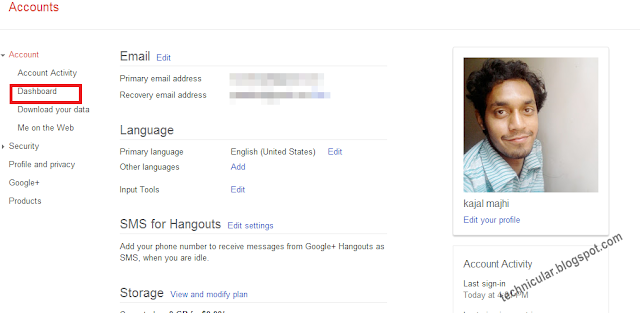
1 Sign in to your Google account here http://accounts.google.com (remember the gmail id , which you have used in your android device)


2. Head you mouse cursor towards "DASHBOARD" and click there. Your dashboard will show you all the Google products that you are using.

recover android phone, andsoid imei number


3 Scroll down a little and you would see a section for ANDROID , click on it.


google products


4 There it is.


Recover IMEI number of lost android phone


Read More

Tuesday, August 6, 2013

Kajal Majhi

How to import a blog post to another blog.

By     1 comment:
I don't mean to copy post of other bloggers. Suppose you have two blogs and you want to post the same post to your another blog, it is very simple, just follow the steps below.


++ Go to your Dashboard, then select the blog from where you want to copy.

++ Now go to posts, then select the post you want to copy and click on edit.

++ When the text editor would open with your written articles, click on EDIT HTML and copy the entire            texts.
++ Go back to Dashboard and again select the blog where you want to post.

++ Create a new post, and enter a title for the post or you may enter the same title that you have already             given

++ Now click on EDIT HTML and paste the copied texts and publish it.


Do you mean to import the entire blog to your another blog?

How to import a blog to another? follow the steps below,

++ Login to your blogger account  and from dashboard select the blog you want to import.

++ Go to settings --->Other

++ Click on Export blog. Blogger will send you a .XML file, just save it. and go back to dashboard.

++ Now again select the blog from dashboard where you want to import or if you have blog in a different           blogger account then login in the account.

++ Just like above process go to Settings and then Others.

++ Now click on IMPORT BLOG and select the file that you have downloaded in the above process and           save it.

++ That is it! you are done.
Read More

Friday, June 21, 2013

Kajal Majhi

Increase battery backup in Android

By     No comments:

Increase battery backup in Android by 4 times.
While we enjoy the smooth experience of Google’s Android OS but it irritates when we get poor battery backup and those who are addicted smartphone user need to carry charger along with them and usually the newbie to smartphones get shocked by its poor backup , and my question is WHY NOT? 


A smartphone has to run it’s processor, runs multiple apps, connect to WiFi, GPS, 3G, light up the big bright screen,  Bluetooth,  music, vibrate, and so on with just a damn battery of 1000 to 2500 mAh.  Its just like backing up a whole building with a car battery, isn’t it?

There are  many apps in the store about increasing battery  backup but they are not going to help much , instead they itself need power to run. Here are some few simple tips by which you can save lots of battery power.


1 Limit the background process

A smartphone can run multiple apps in background which consumes heavy amount power. You can limit the background process and save some power. Just follow the steps below:-
                Goto settings
                scroll down to {}Developer Options
                Scroll down to Background Process Limit
                                the default option is ‘Standard Limit’, but set it                                  to ‘At most 2 Processes’.


2 Dim the screen brightness.

No doubt, we all love the big bright and colourful screen,  but do you know this is the greatest enemy of battery? You can decrease it’s brightness as per required, specially at night as well as it is good for your eyes. However most of the smartphones comes with ‘auto brightness’ feature , if you have this then don’t worry, just be sure that the feature is on.


3 Turn off Bluetooth

As it facilitate us to use our headsets, transfer files, build a small network etc, it also consumes that much of power too and we often forget to turn off the Bluetooth. So turn it off when not in use as it is also safe from being hacked.


4 Turn off WifI

Wow! What a fast internet isn’t it? So don’t forget to turn it off when it is not required, Wifi is an another enemy of your battery. So many of your apps use WifI for updates in background. You can abort these apps from auto update, when you install apps  some apps seek your permission for mode of updates just select to ‘manually’.


5 GPS

Ah! Another big battery power sucker!  It is a lifetime enemy of every phone’s battery.  Firstly it connect to the GPS satellites then pin point your location and then display the location on maps which consume a lots of power. Secondly, many apps use GPS to get your locations to find nearby friends, places, ATMS, Petrol Pumps  etc which needs much of your battery. You can limit or abort these apps from accessing your GPS just like in WifI, while you will install some apps will seek your permission to access your GPS, just say no to them.


Read More